
Stop Losing Opportunities.
Start Building Your Digital Workforce.
More work done. Less pressure. More freedom to grow.
Your customers need answers. Your crew is on the job. Your office has more work than hours in the day. And when important work doesn't get done, you usually pick up the slack.
JJ Eucce & Associates helps construction and home service businesses put self learning digital employees to work in your business —so your people can focus on the jobs they were hired to do.
Free Assessment • Approximately 4 minutes

Illustrative dashboard • Sample data, not client results
Meet your digital team

Alex • Sam • Jordan • Morgan • Casey • Taylor
The hidden cost of growth
How Much Is the Work That Isn't Getting Done Costing You?
Missed opportunities
The inquiry no one returned. The estimate no one followed up on. The past customer who never heard from you again.
Time consumed
Your best people spend hours copying information, sending routine reminders, chasing updates, and answering the same questions.
Payroll pressure
The default answer becomes 'hire another person' before you've examined which responsibilities can be handled differently.
Operational vulnerability
One absence, emergency, or especially busy week pushes critical administrative work onto the owner.
HOME SERVICES CONSTRUCTION PROPERTY MANAGEMENT SERVICE BASED BUSINESSES
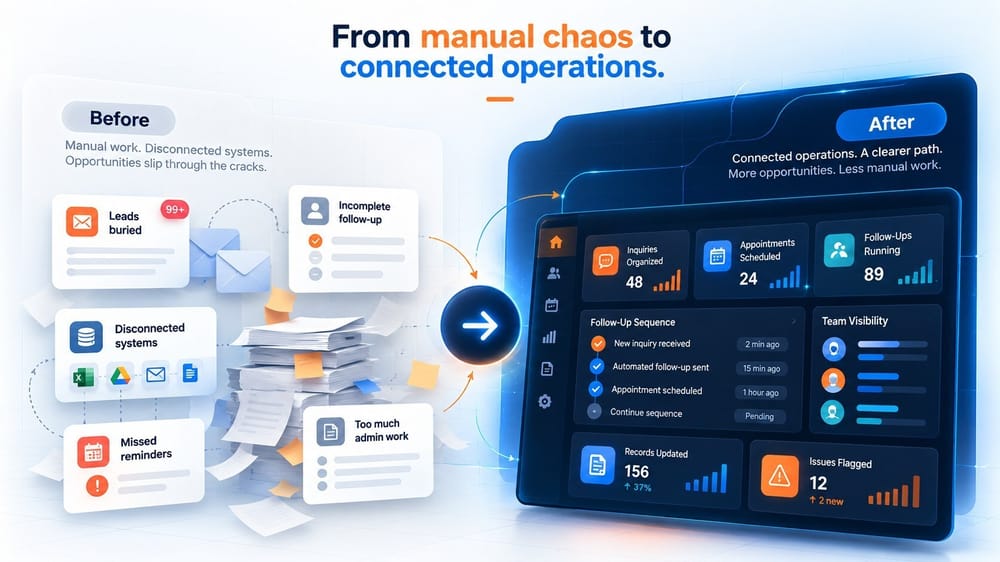
Illustration • Sample data, not client results
You don't always need more people to get more work done. Sometimes you need the right responsibilities handled more consistently.
More than an AI tool
Stop Giving AI Random Prompts. Start Giving Digital Employees Clear Responsibilities.
Chatbot
You ask a question. It responds.
AI agent
You assign a defined task. It performs the permitted steps.
Digital employee
A configured system supports an ongoing business responsibility using defined processes, approved tools, relevant context, checks, and escalation rules.
Not another tool your staff has to figure out on their own. A practical solution designed around the work your business actually needs done.
Built around the way you operate
Your Industry. Your Workflows. Your Digital Workforce.
We understand the pressure points of businesses that serve customers in the field, on site, and on the phone.

Home Services & Contractors
HVAC, plumbing, electrical, roofing, remodeling, landscaping, cleaning, pest control, and related trades.
→ Respond to new service inquiries
→ Follow up on open estimates
→ Coordinate appointments while crews are in the field

Property Management
Residential and commercial property teams balancing tenants, owners, vendors, and maintenance.
→ Organize routine tenant requests
→ Coordinate maintenance scheduling
→ Keep communications moving, with authorized human review

Equipment & Tool Rentals
Rental operations juggling availability, quotes, reservations, and returns.
→ Respond to rental inquiries
→ Follow up on open quotes
→ Coordinate reservations, returns, and reminders

Other Service Businesses
Any business where customer follow-up and recurring administration limit capacity.
→ Follow up with customers consistently
→ Handle recurring administrative work
→ Smooth scheduling and handoffs
Different businesses. Different systems. One objective: make it easier for the right work to get done.
Business continuity
Your Business Shouldn't Grind to a Halt Because Someone Called in Sick.
It's Monday morning. Your office manager is out. Your crew is already on the job. Customers are calling. Estimates need follow-up. Appointments still need to be confirmed.
And suddenly, you're doing three people's jobs.
When a key office employee is out
The work gets pushed onto people with full plates.
The owner
becomes the scheduler.
The salesperson
starts answering customer calls.
The operations manager
spends the day tracking unfinished administrative tasks.
Everyone else
gets pulled away from their primary responsibilities.
With approved workflows still moving
Everyone stays in their lane.
Your office manager
manages the office.
Your sales team
sells.
Your crew
serves customers.
You
lead the business.
A digital workforce can help keep approved recurring workflows moving, even when a person is unavailable.
This is about business continuity and protecting your team's core responsibilities. Digital employees support defined, approved processes. They don't replace the judgment, relationships, or every responsibility of an absent team member.

Why it matters
What Would You Do If Everything Didn't Depend on You?
Take a day off without worrying about unanswered calls.
Let your office manager focus on running the office instead of juggling every unfinished task.
Give your crew the information they need without constantly interrupting their work.
Spend more time growing your company instead of catching up on yesterday's unfinished responsibilities.
More than getting work done.
It's getting your freedom back.
Meet your possible digital team
One Responsibility at a Time. A Digital Workforce Built Around Your Business.
Digital employees aren't chatbots waiting for a question. Each one is configured to support a repeatable business workflow, work within approved tools and rules, and bring exceptions back to a person.

Digital employee • Illustrative role
Alex
Lead Response Coordinator
Never let a new inquiry disappear into a busy inbox.
✓ Organize incoming leads
✓ Prepare or send approved responses
✓ Track follow-up requirements
What Alex helps with
Capturing new inquiries from your website, email, or forms so each one gets a timely, appropriate first response.
Example tasks
Log new inquiries with key details • Send an approved acknowledgment • Notify the right team member • Flag inquiries still waiting on a reply
Workflow example
A homeowner submits a request after hours. Alex records the details, sends your approved "we received your request" reply, and places the lead on your team's morning follow-up list.
Where a person stays in charge
Pricing, scope questions, unusual requests, and anything outside your approved responses go to a person.
Business outcome
Fewer inquiries slipping through the cracks and faster first responses.

Digital employee • Illustrative role
Sam
Sales Follow-Up Coordinator
Keep estimates and sales opportunities from going cold.
✓ Track open estimates
✓ Prepare approved follow-ups
✓ Organize prospect information
What Sam helps with
Keeping every open estimate and sales opportunity visible, with a consistent next step.
Example tasks
Maintain a list of open estimates by age • Prepare follow-ups from approved templates • Remind salespeople when follow-ups are due • Summarize prospect history before a call
Workflow example
An estimate has gone five days without a response. Sam prepares an approved follow-up for review (or sends it within agreed rules), then alerts the salesperson when the prospect replies.
Where a person stays in charge
Negotiation, pricing changes, and any reply that needs judgment go to your sales team.
Business outcome
More consistent follow-through on opportunities you have already earned.

Digital employee • Illustrative role
Jordan
Scheduling Coordinator
Keep appointments, confirmations, and schedules moving.
✓ Coordinate scheduling requests
✓ Prepare confirmations and reminders
✓ Flag scheduling exceptions
What Jordan helps with
The back-and-forth of booking, confirming, and reminding.
Example tasks
Gather scheduling details from requests • Send approved confirmations and reminders • Track reschedule requests • Flag conflicts and exceptions
Workflow example
A customer asks to move tomorrow's appointment. Jordan collects their preferred times, checks them against the rules you've approved, and routes the change to your scheduler to confirm.
Where a person stays in charge
Priority jobs, double-bookings, and exceptions to your scheduling rules go to a person.
Business outcome
Fewer missed appointments and less time lost to scheduling back-and-forth.

Digital employee • Illustrative role
Morgan
Operations Coordinator
Stop carrying every unfinished task in your head.
✓ Track recurring administrative workflows
✓ Monitor pending work
✓ Surface tasks needing attention
What Morgan helps with
Keeping recurring administrative work visible and moving.
Example tasks
Maintain recurring task checklists • Monitor items waiting on information • Prepare daily or weekly status summaries • Surface overdue work
Workflow example
Each morning, Morgan prepares a summary of open paperwork, pending approvals, and overdue items so your office manager starts the day knowing exactly what needs attention.
Where a person stays in charge
Decisions, approvals, and anything involving judgment or exceptions stay with your team.
Business outcome
Less mental load on owners and managers, and fewer forgotten tasks.

Digital employee • Illustrative role
Casey
Customer Care Coordinator
Support customers without overloading your existing team.
✓ Assist with routine customer inquiries
✓ Prepare approved communications
✓ Escalate issues needing human attention
What Casey helps with
Answering routine customer questions consistently, using information you have approved.
Example tasks
Respond to common questions (hours, service areas, what to expect) • Prepare approved status updates • Organize customer conversations • Escalate sensitive issues
Workflow example
A customer asks what to expect before their first service visit. Casey replies using your approved information and logs the conversation. A billing complaint is routed directly to a team member.
Where a person stays in charge
Complaints, billing disputes, sensitive situations, and anything outside your approved answers go to a person.
Business outcome
More responsive customer service without pulling your team away from their primary work.

Digital employee • Illustrative role
Taylor
Growth & Outreach Coordinator
Make time for the growth activities that always get postponed.
✓ Coordinate approved outreach
✓ Support customer reactivation
✓ Organize campaign follow-ups
What Taylor helps with
The growth work that rarely makes it onto the schedule: reconnecting with past customers and following through on campaigns.
Example tasks
Identify past customers due for outreach • Prepare approved reactivation messages • Coordinate campaign follow-up lists • Track responses for your team
Workflow example
Taylor identifies customers who haven't booked in a year, prepares an approved seasonal check-in, and hands interested replies to your team.
Where a person stays in charge
You approve messaging, offers, and campaigns before anything goes out.
Business outcome
Consistent outreach that supports repeat business and growth.
These are illustrative role configurations, not six prebuilt products. Every digital employee is designed around your business, and its availability, actions, integrations, and supervision depend on each engagement.
Find Out Which Digital Employee Your Business Needs First.
Take the free AI Workforce Readiness Assessment to see where your business is losing time and which responsibility is worth starting with.
Approximately 4 minutes • No AI expertise required
Start small
You Don't Have to Transform Your Entire Business Overnight.
Start with one digital employee. Give it one clearly defined responsibility. Measure the results. Expand your workforce when the business case makes sense.
01
One digital employee
Choose the role that would relieve the most pressure first.
02
One responsibility
Define the job, the approved tools, and when a person steps in.
03
Measure results
Track the time recovered and the follow-ups that no longer slip.
04
Expand with confidence
Add roles only when the business case is clear.
What better operations make possible
Get More Done. Give Your People More Room to Do Their Best Work.
Recover valuable hours
Spend less time manually coordinating routine work.
Protect revenue opportunities
Keep more inquiries and estimates from going cold.
Reduce hiring pressure
Evaluate whether increased capacity can delay or avoid certain additional administrative costs.
Improve continuity
Support selected workflows when someone is sick, away, or stretched thin.
More time to grow the business. More space to stay focused. More freedom to step away without everything waiting on you.
Put the opportunity in perspective
What Could Reclaimed Time Be Worth?
The question isn't just "What would digital employees cost?" It's "What are our current bottlenecks costing us?"
Illustrative example 1
5 hours
recovered per week
260 hours
of capacity annually (× 52 weeks)
$7,800
equivalent annual labor-capacity value at an assumed $30/hour. Not cash savings.
Illustrative example 2
10 hours
recovered per week
520 hours
of capacity annually (× 52 weeks)
$15,600
equivalent annual labor-capacity value at an assumed $30/hour. Not cash savings.
What the numbers show
Recovered labor capacity
Hours your team gets back each week to spend on customers, follow-up, and growth instead of repetitive administration.
What they don’t show
Actual cash savings
Money only stays in the business when a cost is truly reduced or avoided, such as overtime or a planned hire, after implementation costs.
Illustrative examples based on assumed labor costs. Reclaimed capacity does not automatically represent cash savings, and actual results depend on implementation, employee utilization, and business conditions.

Meet Jeff
Business experience first. Technology that serves it.
Jeff Eucce brings more than two decades of sales leadership and business-management experience, including general management, customer relationships, inventory, purchasing, team supervision, logistics, and day-to-day operations.
He understands what happens when customer demands grow faster than a small team's capacity—and when the owner becomes the backup for every unfinished responsibility.
Jeff founded JJ Eucce & Associates to help business owners put practical digital employees to work where they can make a meaningful difference.
You don't need an AI lecture. You need a clearer path to getting important work done.
How we work
We don't start with technology.
We start with your business.
01
Discover
Identify the pressure points, missed opportunities, and repetitive responsibilities.
02
Design
Define the right digital roles, tools, permissions, boundaries, and success measures.
03
Deploy
Configure and test workflows, with your team trained on approvals and handoffs.
04
Manage & Improve
Depending on the agreed service, review performance, make approved refinements, and identify next opportunities.
Start with one worthwhile responsibility. Grow the workforce as the business case becomes clear.
The transformation
More Capacity. More Consistency. More Room to Grow.
The purpose of a digital workforce isn't to remove the people from your business. It's to build the systems and support that help your people do their best work, and help you lead.
Frequently asked questions
Good questions. Straight answers.
No. A digital employee is configured around specific workflow responsibilities, approved tools, and checkpoints. It is not unlimited autonomous decision-making.
Not automatically. Many roles include judgment, relationships, and specialized work that remains human. A digital workforce can support selected routine responsibilities and give your team additional capacity.
Potentially. We evaluate integrations, access, permissions, data requirements, and feasibility before defining the scope.
Approved recurring tasks may continue, while exceptions and decisions are routed to designated humans. Coverage depends on the specific workflows deployed.
Pricing depends on the roles, integrations, complexity, implementation, and ongoing management scope. We begin by identifying whether there is a worthwhile business opportunity.
Yes. AI systems can make errors. Defined permissions, testing, monitoring, and human review are essential.
No. You need to explain where work gets stuck. We help evaluate practical options.
Find your best place to start
Your Business Has More Potential Than Your Team Has Hours.
Discover the work slowing you down, the opportunities that might be slipping away, and the kinds of digital responsibilities worth exploring first.
✓ See where time and opportunities are slipping away
✓ Find the digital employee worth starting with
✓ Get a practical next step, with no AI expertise required
Free • Approximately 4 minutes
Prefer to talk first? Contact Jeff
Your Name
Business Email
Industry
Biggest Operational Bottleneck
A practical conversation about your business. No technical expertise required.

JJ Eucce & Associates
Business Operations & Intelligent Digital Workforce Consulting
© 2026 JJ Eucce & Associates